
NEW FEATURES IN 4.09.x
You asked and we listened!
There are many new features and dozens of improvements in PokerTracker 4.09 including:
* The HUD Table Selection Tool Can Be Used To Help Place the HUD at Tables Where A HUD Could Not Be Placed Previously
The Feature Update list for PokerTracker 4.08.x is available for your convenience.
Table Selection Tool
PokerTracker works best when the online poker room provides unique names for each poker table, without a unique name PokerTracker cannot determine where to place the HUD at the table. If a unique table name is not available, then PokerTracker will automatically display the Table Selection Tool to allow you to manually assign the HUD to the right table.
The Table Selection Tool will appear anytime you are playing at a poker table that does not have a unique name, use the player list and accompanying stack sizes to match the game to the table using the interface arrows to switch between your options, once the correct selection is made click Match to place the HUD at that table.
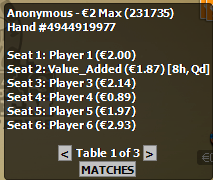
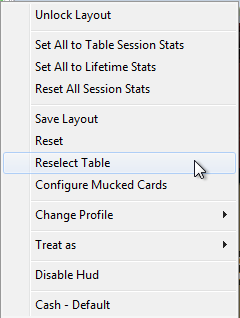
If you need to alter the HUD selection, click the PokerTracker 4 HUD icon, and chose Reselect Table.
You can disable this tool from automatically appearing by visiting HUD > Edit HUD Options > Advanced then uncheck Allow Table Selection Dialog When Necessary. The iPoker, Microgaming (MPN), and Winning Poker networks will all use the new Table Selection Tool when a unique table name is not available.

