
NEW FEATURES IN 4.07
You asked and we listened!
There are many new features and dozens of other improvements in this PokerTracker 4 update including:
* PokerTracker 4 for Mac OS X
* Copy Player Statistics With your Hand Histories
* New Graph Configuration Options
* New Tournament Import Configuration Options
* Improved Holdem Equity Calculations
* OnGame’s Strobe Poker tables are now supported
* PokerStars Zoom Tournaments are now supported
New Features Found in PokerTracker 4.07.x
PokerTracker 4.08.x is the latest major release of PokerTracker 4, but you can continue to review the new features found in the prior 4.07.x version at your convenience by reviewing the New Features found in the version 4.07.x Infographic.
Table Selection Tool
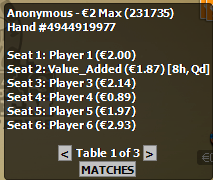
PokerTracker works best when the online poker room provides unique names for each poker table, without a unique name PokerTracker cannot determine where to place the HUD at the table. If a unique table name is not available, then PokerTracker will automatically display the Table Selection Tool to allow you to manually assign the HUD to the right table.
The Table Selection Tool will appear anytime you are playing at a poker table that does not have a unique name, use the player list and accompanying stack sizes to match the game to the table using the interface arrows to switch between your options, once the correct selection is made click Match to place the HUD at that table.
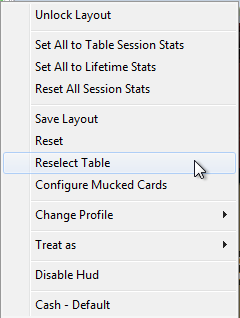
If you need to alter the HUD selection, click the PokerTracker 4 HUD icon, and chose Reselect Table.
You can disable this tool from automatically appearsing by visiting HUD > Edit HUD Options > Advanced then uncheck Allow Table Selection Dialog When Necessary. The iPoker, Microgaming (MPN), and Winning Poker networks will all use the new Table Selection Tool when a unique table name is not available.
Database Caching of Custom Columns
Custom stats that use default database columns are typically cached, however custom stats that require the use of custom columns could not be cached prior to the release of PokerTracker 4.11; this is the first version of PT4 that allowed custom database columns to be cached. This new caching feature means that HUD and report performance will be faster than ever before for users who incorporate home made custom stats or free stats taken from the PokerTracker Database Warehouse.
For more information about Database Caching prelease review our new Database Caching Guide: https://www.pokertracker.com/guides/PT4/databases/database-caching-guide
Call PF 3Bet After Raise
For a long time 'Call PF 3Bet After Raise' has been our most popular stat in the PokerTracker Download Warehouse. We saw how popular this stat was, and decided to add it to PokerTracker 4 as a default stat - you will not longer need to download this stat from the Download Warehouse, it is now available to all PokerTracker 4 users automatically. Thanks to our new Database Cache redesign, Call PF 3Bet After Raise will automatically be cached!
Database Update Required
A database update is required after installing PokerTracker 4.11, please allow this update to be completed. If you have a large database please postpone installation of 4.11 until your session is complete to avoid interfering with your playing schedule. Please be aware that if this database update is canceled or bypassed PokerTracker 4.11 will not work properly until a cache rebuild is manually executed.

It is advised that you update your database when promoted as a precaution.

Copy Player Statistics With your Hand Histories!
Everyone loves sharing hands with their friends. Now when you copy a hand with this new option enabled the most important stats will be copied along with the hand.


New Graphs Configuration Options!


You can set the thickness to one of Five different sizes.

And you can use thickness 0 to make a line completely disappear – so you can focus more on your game and less on your results!

New Tournament Import Configuration Options
All of our tournament import options are now easier to find in the Site and Import Options area.

All of our tournament related import options are displayed here.
These configuration options give you great power over how Tournaments are detected and treated at import time. We have added help icons for each section to help explain which settings are right for you.

PokerStars Zoom NL16
PokerStars players who use the Zoom HUD at 16 NL stakes may experience HUD refresh delays and inaccurate data displayed due to incompatibilities with PokerStars at this time. In the event this issue is rectified in the future, this release note will be updated to reflect the change if and when this occurs.
If you wish to play at PokerStars Zoom 16NL tables, we recommend on of the two following options:
Chose an alternate stake other than NL 16 while playing at Zoom cash game tables
Disable the Zoom HUD in PokerTracker 4 by selecting Configure > Sites & Import Options > PokerStars and then uncheck the Zoom HUD box. Click OK to save your changes.
We will continue to provide additional updates as more information becomes available.

Improved Equity Calculations
Last but not least, the equity calculations when there is a chance to split the pot has been improved. This will give you perfectly accurate equity and ICM calculations.

